Git Bash Completion and Detail
One of the things I can’t live without is git bash integration in my $PS1.
This gives me feedback on the branch and status of my current directory.
Here’s an example screenshot:
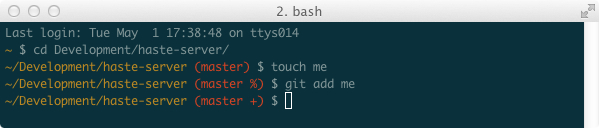
So how do you get this set up? Here’s how I do it (in ~/.bash_profile):
GIT_COMPLETION_PATH=/etc/bash_completion.d/git
if [ -f $GIT_COMPLETION_PATH ]; then
  . $GIT_COMPLETION_PATH
  GIT_PS1_SHOWDIRTYSTATE=true # */+ for dirty
  GIT_PS1_SHOWSTASHSTATE=true # $ for stashes
  GIT_PS1_SHOWUNTRACKEDFILES=true # % for untracked
fi
And then you can just include the git completion function in your $PS1 where you want it. My $PS1 is super simple, and just has this and the current path (and some nice colors):
export PS1="\e[0;33m\w\e[0;91m\$(__git_ps1 ' (%s)')\e[0;96m \$\e[0m "
Note: the location of your git bash_completion directory may be different (especially if you installed git via homebrew). I like to solve that with a symbolic link, instead of changing this configuration (I just find it cleaner that way - much nicer for upgrades too):
git -> /usr/local/Cellar/git/1.7.9.6/etc/bash_completion.d/git-completion.bash
If you like this - read more of my dotfiles.